Introducing My Live Chatbot Component Set — A Smarter, Friendlier Way to Support Users
In today’s digital world, users expect quick answers, smooth interactions, and human-like assistance—without waiting in long support queues. To help brands deliver that experience, I designed a Live Chatbot Component Set that blends clarity, accessibility, and a polished UI into one seamless system.
This new component pack is built to fit effortlessly into modern websites, dashboards, SaaS products, and customer support systems. It doesn’t just “look good”—it feels intuitive, responsive, and trustworthy from the very first interaction.
Why I Created This Component Set
A chatbot isn’t just another widget anymore. It’s a digital representative of your brand—how it looks, talks, and feels directly influences user trust.
But many chat UI kits fall short in three areas:
- Lack of personality
- Poor accessibility
- Inconsistent layout and styling
I wanted to build something that solves these problems while staying clean, friendly, and adaptable to any type of product interface.
What’s Inside the Live Chatbot UI Pack
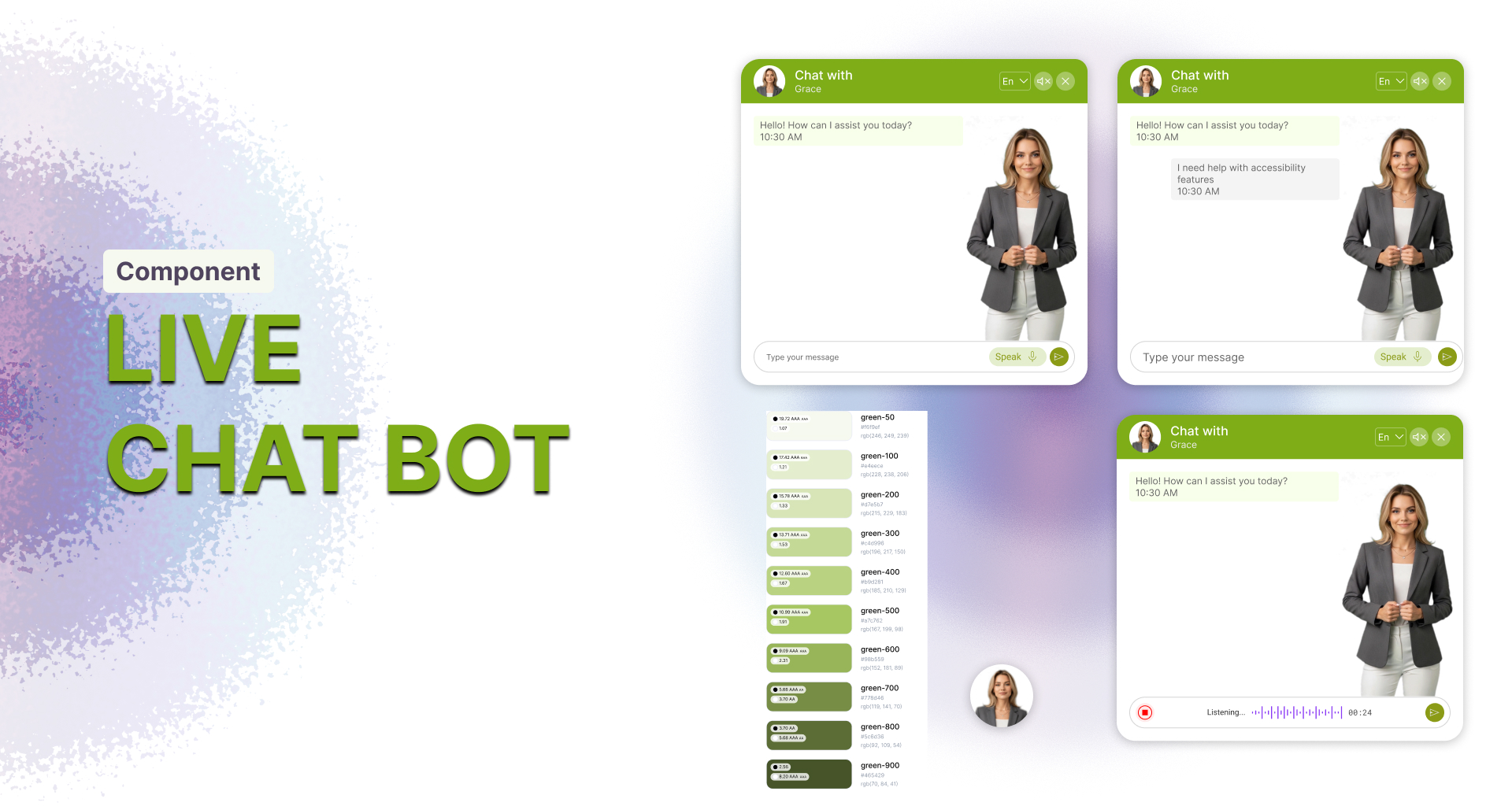
The component set includes a variety of layouts that showcase different conversation states, message flows, and interaction modes. Here’s what it covers:
✅ Clean Conversation Layouts
Each chat window presents a well-structured message flow—timestamps, message alignment, and spacing are optimized for readability.
✅ Voice Interaction Elements
From microphone input to listening animations, the design supports voice-enabled communication for accessibility and hands-free usage.
✅ Message Input Variants
Whether typing or speaking, users get clear input states with actionable buttons and micro-interactions.
✅ Color System Included
The full green color palette is showcased in the design, providing a flexible branding guide for developers and designers who want to customize the system.
✅ Multiple Interaction Screens
Typing state, audio response mode, and conversation view—all covered with consistent visual language.
✅ Human-like Assistance Avatar
The interface includes a welcoming assistant avatar that adds warmth and personality to the conversation, helping users feel supported rather than “served by a machine.”
Built for Real-World Use Cases
This component system fits perfectly in:
- SaaS dashboards
- Customer support centers
- Healthcare portals
- Finance and banking dashboards
- E-commerce platforms
- Educational platforms
- Product onboarding systems
Whether the goal is to reduce friction in support or automate frequently asked questions, this UI kit adapts effortlessly.
Design Highlights
- Modern, Friendly Aesthetic
Soft shadows, rounded corners, and spacious layout create a warm, professional look.
- Accessibility in Focus
Large buttons, clear contrast ratios, and multiple input modes ensure inclusivity.
- Consistent Branding System
A structured green palette makes it easy for brands to adapt the look while keeping things cohesive.
- Human-Centered Approach
The interface is built for comfort—easy to read, easy to navigate, and easy to trust.
Why This Matters for Modern Brands
Good support builds loyalty. Fast support builds conversion.
This Live Chatbot Component Set helps businesses achieve both—by giving users an instant connection point and giving teams a beautiful, scalable interface to build on.
It’s not just UI.
It’s a customer experience upgrade.
Final Thoughts
This Live Chatbot Component Set is designed to empower product teams, enhance user experience, and make support systems feel more human. Whether you’re building a new product or upgrading an existing system, this UI pack offers a strong foundation to create smooth, delightful chat interactions.
If you’d like to integrate or customize this design for your brand, feel free to reach out—I’d love to help you bring it to life.